

PROTECT YOUR WEBSITE FROM HACKERS
Don’t let hackers know that you are using WordPress.
With Hide My WordPress Ghost, you can hide the fact that you are using WordPress.
Download Free Hide My WP
Go to Hide My WP Ghost
The Most USER-FRIENDLY WordPress Security Plugin.
Hide My WP Ghost is a WordPress Security plugin and works like security through obscurity solution for WordPress websites.
Security through obscurity is the best solution against hacker’s bots. This is the best way to protect vulnerable plugins and themes.
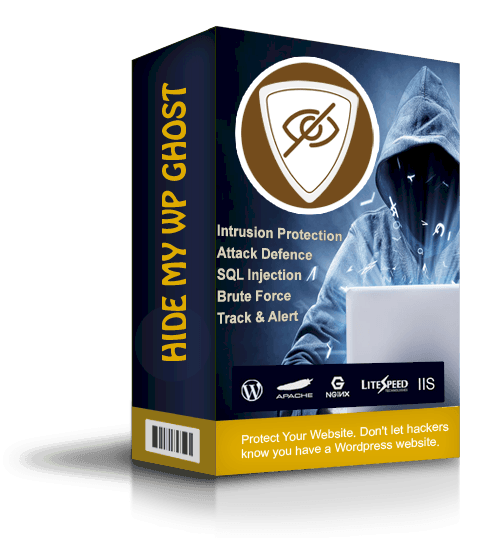
Vulnerability Protection
Protect your website against things like:
Brute Force Attacks
Script Injection Attacks
SQL Injection Attacks
Cross Site Scripting (XSS)
Throttling of Access Attempts to Entry Points
Trusted by over 50k users
“… For a little investment you own a PRO version, and everyone should opt for that. The man behind this plugin is also freaking amazing. … He has 20 years of development experience, and he can really do all. I adore such people even more when they have a great personality. So, my experience with both the plugin and the custom support is more than 5 star worth. THANK YOU JOHN !!!”

Romanzys
“Enjoyed it. Very innovative plugin that helps with security. You can’t beat that for a free plugin. Would like to see more areas that need to be hidden or prevent hackers from accessing. Keep up the good work!”

@k318wilcoxa
“I purchased the paid version. I’ve tried several other paid “Hide WP” and this was super easy to install but most of all, the support is fantastic. I had a little hiccup with my theme but John got right on it and solved it immediately. The other very popular Hide WP plugin wouldn’t work with my theme, I waited weeks and never got a solution. So glad I found this little gem!”

Lisa Abke
“..This plugin guarantees they’ll make the plugin work on your site, or they’ll give your money back.
And that was exactly the case for me. Their support responded immediately and they took all the necessary effort to solve the issue.
That’s what I look for on services, trustworthy people who are willing AND happy to solve my problem/s.
The plugin works perfectly with my WordPress installation now.”

@OneWordPresser
“It’s working perfectly and I’m glad there are still some good developers that are on WordPress that actually care about their plugins. Most don’t and that’s horrible.
Most just try to blame it on other things and don’t even bother to see what the issue is.
Anyways. It’s got a lot of options to it and perfect for a security plugin and really simple to use. Take it from me. USE IT.”

@destructiveburn
“The free version works well, I bought the pro version and it’s very easy to setup. Also, the support is great and John answered to all my questions.
Thank you for such a great plugin, John!”
@adellaw
“I absolutely love this plugin! Its simple, but works great and does exactly what I need.”

@zsauce
“Easy installation, easy to configure, worked like charm with Woocommerce login and registration and with OneAll Social Login.
Hid and renamed wp-admin and wp-login.”

Aline Mendes
Previous
Next
Hide My WordPress Ghost Features

Previous
Next
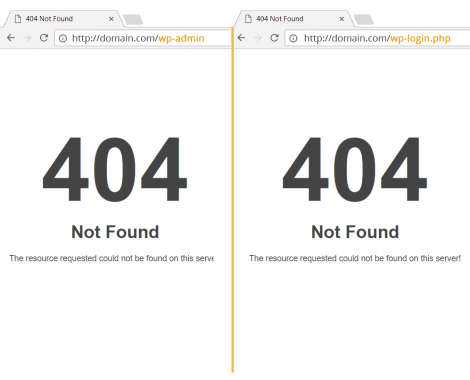
Hide URLs
Hide WordPress wp-admin URL
Hide WordPress wp-login.php
Hide WordPress wp-login URL
Hide WordPress login URL
Hide WordPress admin-ajax URL
Custom Paths
Custom WP admin and login URL
Custom WP wp-includes path
Custom WP wp-content path
Custom WP plugins & themes path
Custom WP uploads path
Custom WP authors path
Custom WP comment URL
Custom WP category & tags path
Custom WP API Rest path


Previous
Next


Previous
Next
advanced
Random plugins names
Random themes name
Remove unwanted classes
Remove ids from stylesheets and scrips
Custom style.css for themes
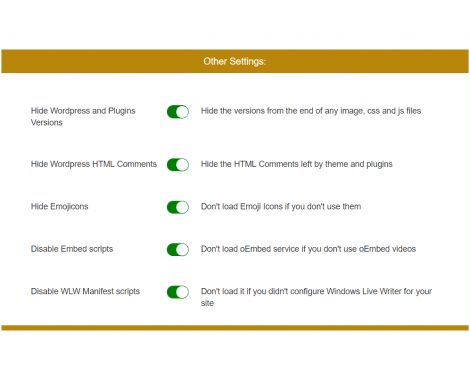
Hide & Disable
Hide Style IDs and Script IDs
Hide Emojicons if you don’t use them
Disable Rest API access
Disable Embed scripts
Disable WLW Manifest scripts
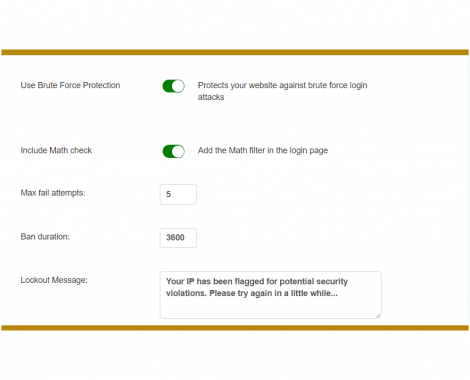
Brute Force Protection
Brute Force Attack Protection
Math function in Login Page
ReCaptcha on Login Page
Custom attempts, timeout, message
Blacklist and Whitelist IPs

Best WordPress
Protection

Brute Force
Prevention

Security
Check

Activity
Log

WordPress
Tweaks

Faster Than Others
Hide My WordPress Ghost is a speed optimized plugin. The average loading time is 0.03s which is faster than 90% of the WordPress plugins. This will help your website rank better in Search Engine.

Easy To Use
You can install and setup the plugin in less than 5 minutes. You don’t have to be an expert to make it work. No programming knowledge required.

Compatible With Other Plugins
Hide My WordPress Ghost was tested with over 1000 other themes and plugins. Works with the most popular Cache Plugins, Security Plugins, CDN Plugins, and WordPress Themes.

WordPress Multisite
Hide My WordPress GHOST works with WP Multisite on sub-directories and sub-domains.

Professional Suport
We offer WordPress professional support that includes: bugs, site fixes, payment processing issues, website speed and much more.

30 Days Money Back
according to our Terms of Service
We offer a full refund for the first 30 days after purchase, based on our Refund Policy.
Speed BONUS
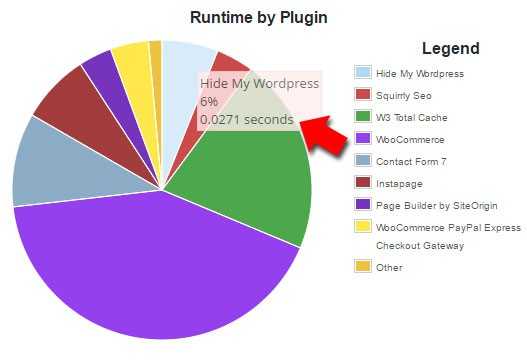
Hide My WordPress Ghost is a speed optimized plugin.
The average loading time is 0.03s which is faster than 90% of the WordPress plugins.
This will help your website rank better in Search Engine.
WordPress Security Check for Your Website
1. Detects security breaches
2. Takes preventive measures against attacks
3. Identifies security or access issues on your website before they become a problem
4. Teaches you how to fix them in case of manual action is need


1. Monitors, tracks and logs events on your website
2. Knows what the other users are doing on your website and when
3. You can set to receive emails with alerts for one or more actions
4. Filters events and usernames
5. Saves time with alerts and opportunities
1. Hide WordPress for Logged Users
2. Hide Versions and WordPress Tags
3. Hide RSD (Really Simple Discovery) header
4. Hide WordPress HTML Comments
5. Hide Emojicons
6. Disable XML-RPC access
7. Disable Embed Scripts
8. Disable WLW Manifest scripts
9. Disable DB Debug in Frontend

Awesome Integration
Subdomain and Subdirectory WordPress Multisites
Apache Server (Add extra security into .htaccessScripting (XSS))
Nginx server Bitnami Servers LiteSpeed Server
IIS server Wp Rocket plugin WpEngine Servers




Previous
Next
Get it NOW
How to install and setup Hide My WordPress Ghost
Hide My WordPress Ghost comes with technical support and money back guarantee in case we can’t make it work on your website.
Check Your Website Vulnerability
Verify if Your WordPress Website is Detected by Hackers Bots
Redirecting to https://account.wpplugins.tips.A recent study show us that
73.2% of the most popular WordPress installations are vulnerable to vulnerabilities which can be detected using free automated tools.
Hide my WordPress Ghost is an easy to use product designed to provide you with the best protection against hacker both. When you start using this plugin, you will be able to hide the fact that you are using WordPress on your site but most important, you will be able to protect all the vulnerable plugins and themes installed on your website.
Being able to hide the common paths is critical, because you get to keep intruders away from sensitive website data. This is crucial, and it will provide you with a great experience and really good results in the long term. It will surely be worth it, not to mention that hiding the common paths will make hacking a lot harder as well.
You can find some ways to detect if the website is WordPress based or not.
Once you start using Hide my WordPress Ghost, the website security will be improved, you will receive constant updates, and you also get a Ghost Mode that automates most of the features.
You won’t have to worry about hackers anymore once you start using Hide My WordPress Ghost because this is the tool you have to use whenever you want to take the website security to the next level.
So, give it a shot and hide the common paths in WordPress right now. This will offer you the much-needed security boost!
Copyright © Wpplugins.tips